
Two facts decide how connected you will be in Iran. Your home SIM will probably not roam here, because many foreign carriers have no working agreement with Iranian networks. And a long list of the apps you use every day is blocked, including the ones you would normally use to tell people at home that you arrived safely.
Neither of these is a disaster, and neither should change whether you come. Both mean that twenty minutes of preparation before you fly is worth more than anything you can do once you land. This guide is that preparation, plus an honest account of what the internet is actually like here day to day.
Before you plan anything: this is a guide to connectivity, written to be useful whenever you are able to use it. Whether to travel to Iran at present is a separate question with a different answer — see our current situation report, reviewed 10 September 2026.
What the Internet Is Actually Like Here
Better than most visitors expect, and more restricted. Mobile data covers the whole of the classic route and almost every road between the cities on it. In practice you can expect somewhere between ten and thirty megabits in a city — enough for maps, messaging, photographs and a video call that occasionally stutters. The largest cities have 5G; everywhere else runs 4G that works.
What you lose is not speed. It is reach. A national filtering system sits between Iranian users and a long list of foreign platforms, and the list has grown rather than shrunk over the past few years. Iranians work around it constantly and openly — this is an everyday fact of life here rather than a secret — but as a visitor you should plan for the blocked version and treat anything more as a bonus.
What Works and What Does Not
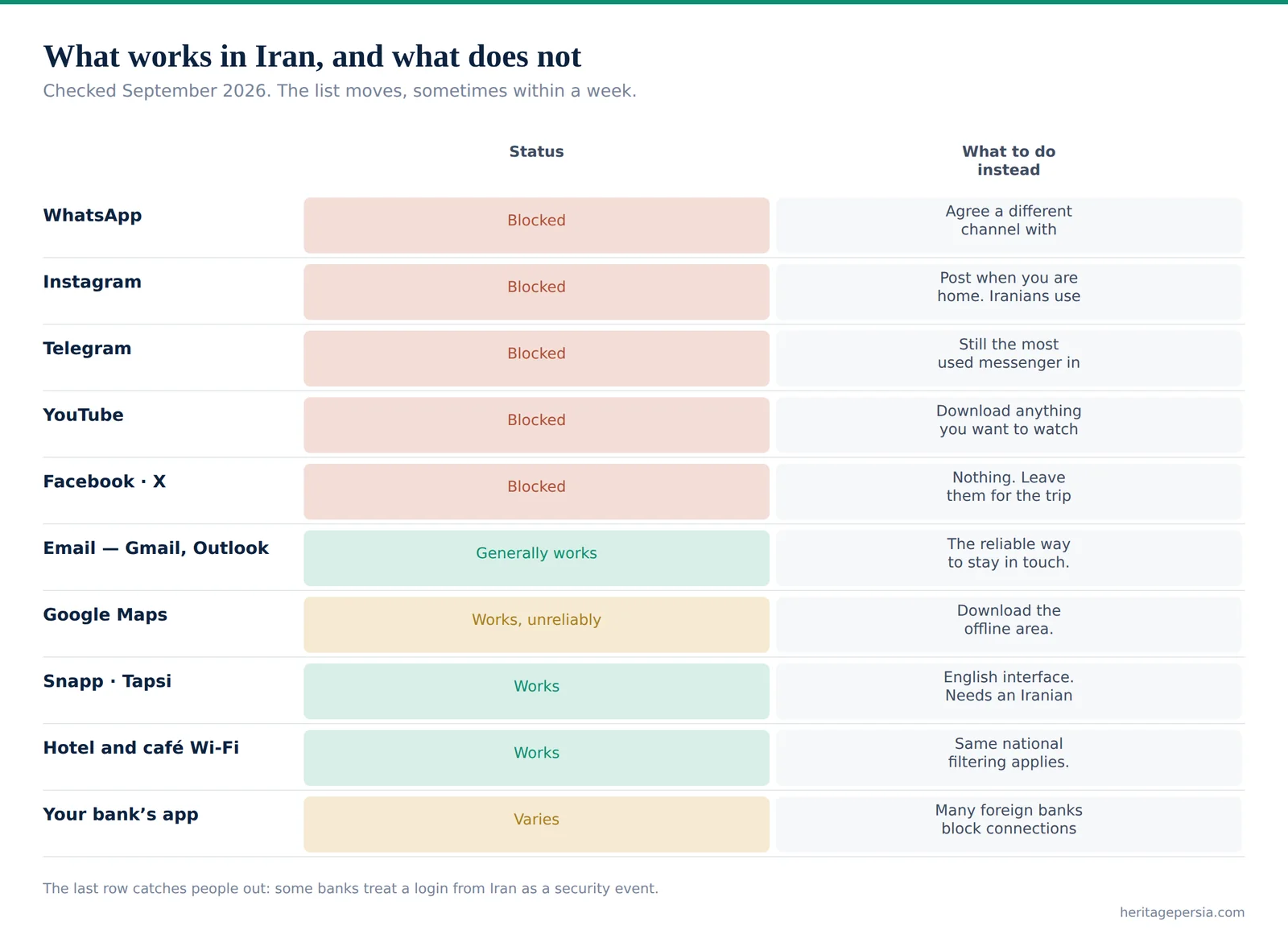
Checked September 2026. The list moves, sometimes within a week, so treat it as the shape of the problem rather than a permanent state.
| Service | Status | What to do instead |
|---|---|---|
| Blocked | Agree a different channel with family before you fly | |
| Blocked | Post when you are home. Iranians use it heavily anyway | |
| Telegram | Blocked | Still the most used messenger in Iran, restrictions notwithstanding |
| YouTube | Blocked | Download anything you want to watch before you arrive |
| Facebook · X | Blocked | Nothing. Leave them for the trip home |
| Email — Gmail, Outlook | Generally works | The reliable way to stay in touch. Set it up before you leave |
| Google Maps | Works, unreliably | Download the offline area. Locals use domestic map apps |
| Snapp · Tapsi Ride-hailing | Works | English interface. Needs an Iranian number to register |
| Hotel and café Wi-Fi | Works | Same national filtering applies. Not a way around anything |
| Your bank’s app | Varies | Many foreign banks block connections from Iranian addresses |
The last row catches people out. Some banks treat a login from Iran as a security event and lock the account, which is a problem you cannot solve from here — tell your bank you are travelling, and do not rely on being able to reach it.
Getting a Local SIM
Four operators run networks here. Irancell and Hamrah-e Aval — sometimes written MCI — are the two large ones and either is fine; MCI is the oldest and has the broadest rural reach, Irancell is the one most tourist booths sell. RighTel and Shatel are smaller and there is no reason to seek them out.
Buying one is straightforward. There are booths in the arrivals hall at Imam Khomeini in Tehran and at the other international airports. Iranian regulations require the SIM to be registered in your name, so you hand over your passport and fill in a short form. A prepaid tourist SIM with around ten gigabytes costs roughly two to five euros.
💡 Do this in the arrivals hall, not later. A local number is what registers you for Snapp and Tapsi, and those two apps will save you more money and confusion over a fortnight than anything else you do on day one. Buying a SIM in town afterwards is possible but slower, and the shop may want more paperwork than the airport booth does.
What about eSIM? It exists and it is inconsistent. Support is new here and travel eSIMs sold abroad do not reliably connect. If your phone has a physical SIM slot, use it. If it does not, buy a travel eSIM as a backup but do not build your trip on it.
What about roaming? Many foreign carriers have no working arrangement with Iranian networks because of sanctions, so the honest planning assumption is that your home number will not work at all. Tell the people who need to reach you before you fly.
About the Blocking, Plainly
We are not going to write a guide to getting around a country’s filtering system, and you should be wary of travel sites that do. What is worth saying is factual and useful.
The filtering is national and applies to every connection inside the country, mobile or fixed, hotel Wi-Fi included. Software that circumvents it is widely used by ordinary Iranians and is sold openly, while also being formally discouraged — the legal position is ambiguous rather than clear, and enforcement in practice falls on people distributing tools, not on tourists. Whatever you decide, download it before you arrive, because the sites that provide such software are themselves generally unreachable from inside Iran.
The more useful point is that you can have a very good trip without any of it. Email works. Hotel staff will call you a taxi. Maps work offline. And the blocked list is a genuinely small loss for two weeks.
The Twenty-Minute Checklist
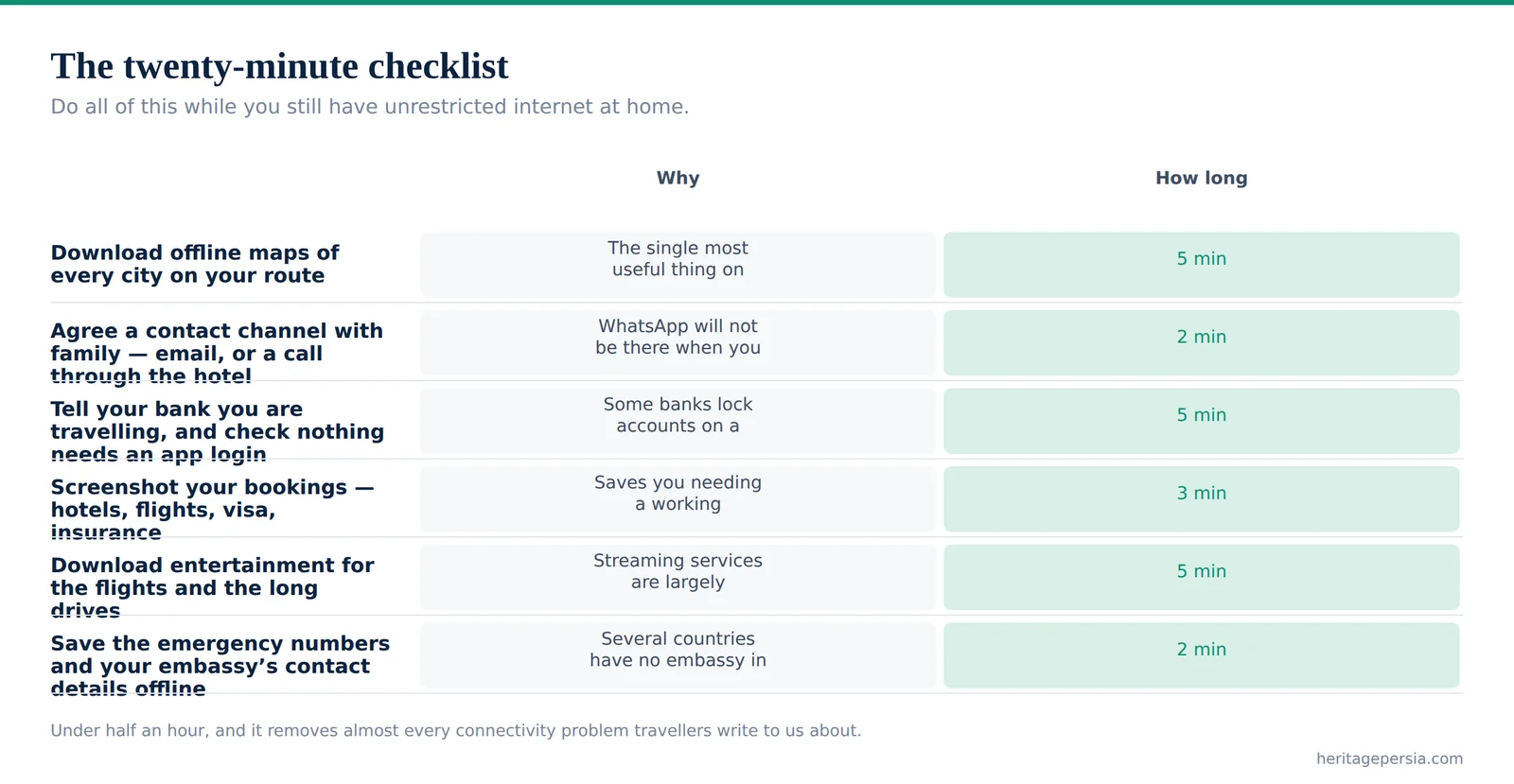
Do all of this while you still have unrestricted internet at home.
| Do this | Why | How long |
|---|---|---|
| Download offline maps of every city on your route | The single most useful thing on this list. Works with no signal at all | 5 min |
| Agree a contact channel with family — email, or a call through the hotel | WhatsApp will not be there when you land | 2 min |
| Tell your bank you are travelling, and check nothing needs an app login | Some banks lock accounts on a connection from Iran | 5 min |
| Screenshot your bookings — hotels, flights, visa, insurance | Saves you needing a working connection at a bad moment | 3 min |
| Download entertainment for the flights and the long drives | Streaming services are largely unreachable | 5 min |
| Save the emergency numbers and your embassy’s contact details offline | Several countries have no embassy in Iran at all | 2 min |
Everything here takes under half an hour and removes almost every connectivity problem travellers actually write to us about.
What Iranians Actually Use
Worth knowing, because it is what the person helping you will reach for. Snapp and Tapsi for taxis, both with English interfaces. Snappfood and its competitors for delivery. Domestic map applications that are better than Google’s for Iranian addresses and traffic. Telegram, restrictions or not, remains the country’s main messaging platform, and Instagram remains the shop window for a large part of the economy.
For a visitor the two that matter are the taxi apps. Everything else you can do without, or ask your hotel to do for you.
Restrictions and Shutdowns
Iran has imposed broad internet restrictions during periods of unrest, including near-total shutdowns lasting days. This is not a theoretical risk and it has happened more than once in recent years.
Plan so that a shutdown is an inconvenience rather than a crisis. Keep your bookings offline. Keep enough cash that you are not depending on a connection to pay for anything — see the money guide, which explains why you are carrying cash regardless. Tell family in advance that a gap in contact is possible and does not mean something has happened. And if you are travelling with a licensed operator, your guide will have a working local network and a phone that keeps functioning when the data does not.
Practical Notes
Power. Iran uses the European two-pin plug at 230 volts. Bring a European adapter, not a universal one that fits badly.
Photography. Photograph freely at monuments, in bazaars and in the street. Do not photograph military sites, government buildings, airports or police. Ask before photographing people, particularly women, and expect a yes.
Working remotely. Possible for email and documents, frustrating for anything that depends on a video platform or a corporate VPN. If your job needs either, test it before you commit to working from here.
Your phone itself. Bringing a phone in for personal use is normal and nobody will stop you. Registering a handset for long-term use on an Iranian network is a separate bureaucratic matter that does not apply to a tourist stay.
✉️ Want a SIM waiting when you land? Tell us your arrival flight and we will have a registered local number ready in the arrivals hall, so the taxi apps work before you reach the hotel. Talk to our team →
Getting Online Without a Local SIM
It is possible, and it is worse. Every hotel above the simplest guesthouse has Wi-Fi, and it is generally adequate for email and messages, though it carries exactly the same national filtering as the mobile network — a hotel connection is not a way around anything. Cafés in the larger cities have it too, and the traditional teahouses in the bazaars increasingly do.
What you lose without a local number is the thing that matters most, which is the taxi apps. Snapp and Tapsi both register against a phone number that can receive an Iranian SMS, and there is no way around that requirement. Without one you are dependent on your hotel to call a car, on street taxis where the fare is agreed before you get in, or on the metro.
Our advice for a two-week trip is unambiguous. Spend the five euros in the arrivals hall. The number pays for itself within two days in taxi fares alone, and it removes the single most common source of friction we hear about from independent travellers.
Calling Home
Voice calls over the mobile network work normally, including international calls, and they are inexpensive by European standards. What does not work reliably is the thing most people now use instead — calls placed inside a messaging app, since the apps themselves are blocked.
So plan for the older approach. A local SIM with a small credit balance will place an international call to a landline or a mobile anywhere. Hotels will place calls for you. And an email arriving once a day is, for most families, entirely sufficient reassurance.
Two numbers to save offline before you fly. The Iranian emergency services are reached on 110 for police, 115 for ambulance and 125 for fire. And your own embassy’s contact details — with the caveat, set out in our situation report, that several countries have no embassy in Iran at all and handle consular matters from a neighbouring capital.
Continue reading
Frequently Asked Questions
What travellers ask our guides, answered on the ground.
A SIM in the Arrivals Hall
Tell us your flight and we will have a registered local number ready when you land.
Arrange It →